

























GoHighLevel Snapshot Automation System for Repeatable Client Setups
Having to build the same pipelines, forms, and processes for each new client is not only tedious but can lead to errors.
A good snapshot system allows you to set up once, properly test it, and reuse it any time another account comes through needing it. Our snapshots are structured so that onboarding can be streamlined and repetitive tasks eliminated.

What a GoHighLevel Snapshot Is
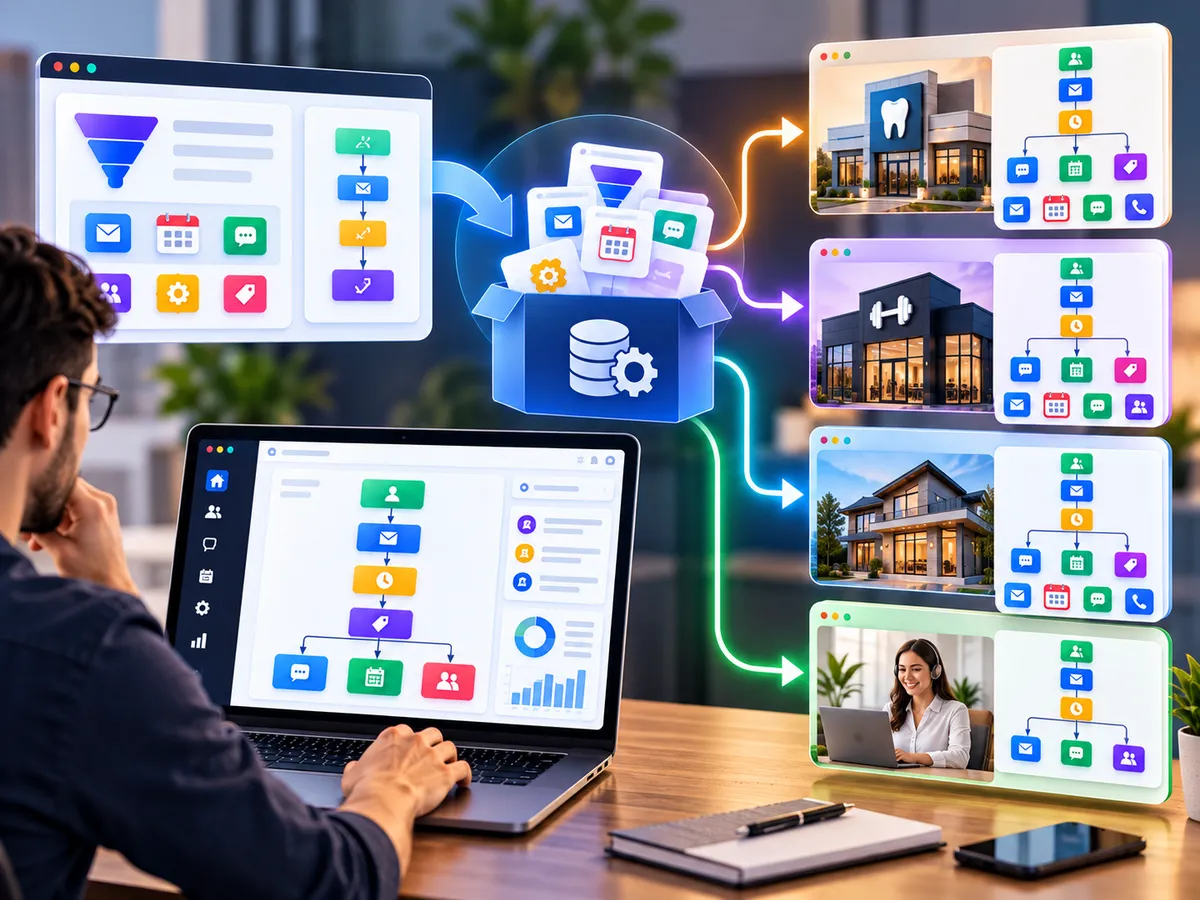
A snapshot is a saved copy of selected assets from a GoHighLevel account that can be loaded into another account. Think of it as a master template for a type of client, such as a dental clinic, a coach, or a real estate team.
A single snapshot is just an empty container in itself. Snapshot automation process includes the process of planning involved in determining what goes into the snapshot, testing of the snapshot, customization for individual customers, and maintaining the snapshot. The planning distinguishes a solid process from a mere collection of duplicated configurations.
Assets a Snapshot Can Include
Supported assets commonly include:
Workflows and automation recipes
Funnels and websites
Forms and surveys
Calendars
Pipelines and stages
Custom fields and custom values
Email and SMS templates
Tags and other supporting settings
Exactly what transfers depends on the asset type and the current platform. We check this during preparation so the snapshot behaves as expected.

Why Agencies Build Snapshot Systems

Less Repetitive Setup
Instead of rebuilding common elements, your team starts each account from a prepared base and customizes only what is client-specific.

Consistent Quality
Every client receives the same tested structure, which means fewer missed steps and easier support.

Easier Team Training
When accounts look alike, new team members learn one layout rather than many.

Clearer Offers
A snapshot built for one niche helps you describe and price a defined service package.
Our Snapshot Development Process
01
Preparation
We define the use case, client type, and the assets to include.
02
Configuration
Pipelines, workflows, forms, calendars, and fields are built with consistent naming.
03
Testing
We test the master account thoroughly, including form submissions, triggers, and messages.
04
Importing
The snapshot is loaded into a clean test account to confirm it transfers correctly.
05
Customization
We prepare a checklist for client-specific changes such as branding, contact details, and integrations.
06
Deployment
The snapshot is used for live accounts, with notes on any manual follow-up steps.

Limitations to Plan For
Snapshots are very strong, but they are not a miracle cure. For instance, things like integration, calendar syncs, payment systems, domain names, and telephone numbers will have to be set up anew for each account. Some elements might not even transfer at all, and support on platforms evolves.
Even if you are updating an account which currently uses an older version, this requires a more considered strategy, because a snapshot is simply a point-in-time copy. We document all these aspects so that you are aware of them.

Keeping Snapshots Organized
The ghl snapshot system needs good naming conventions, versioning information, and a brief checklist for deployment. This gets developed from scratch.
Changing things in your services would become simpler when you just have to update the master account and release a newer version.
Frequently Asked Questions
What is a GoHighLevel snapshot used for?
It lets you copy a prepared account structure into new accounts, saving repetitive setup work.
Can every setting be included?
No. Supported assets vary, and some items must be configured again after import.
Can you convert my existing account into a snapshot?
Often yes, after a cleanup and review. We check which parts are suitable first.
Do snapshots update existing client accounts automatically?
Not by default. Updates need a planned process.
Start Your Snapshot Project
Describe the type of client you set up most often, and we will outline what a reusable snapshot for that account could include.

Are You Looking?
Looking for a reliable and cost-efficient web developer? You have got all the business ideas but looking for an extra push in web designing and technical knowledge? Well, here we are!
Address
140 Mohalla Pataytan Lawar, Daurala, Meerut, Utter Pradesh, India 250222


© Copyright Funnel Pandit. All Rights Reserved 2026