









17 GoHighLevel Automations That Save Agencies 20+ Hours
17 GoHighLevel Automations That Will Save You 20+ Hours Per Week
Time is Draining Your Agency, But There Are Simple Solutions
You founded your agency to do more important things than spending all day moving contacts from spreadsheet to spreadsheet, sending texts manually, and reminding your clients of upcoming calls.
And yet, here you are, struggling with all sorts of menial tasks that could've been automated weeks, maybe even months ago.
Fortunately, GHL automation was created precisely for such reasons. The GoHighLevel workflow builder is perhaps the most powerful tool at the disposal of modern agencies - but only if you actually create the proper automations with it.
The majority of agencies utilize 20% of the potential of GoHighLevel. Below are 17 automations that you need to create immediately to save yourself 20+ hours per week.
How GoHighLevel Automation Transforms Agencies
Before diving into our list of things you should automate with GHL, here’s what you need to know: Anything that is done manually in your agency multiple times can be automated through GoHighLevel.
Following up with prospects. Reminders about appointments. Changing pipeline stages. Onboarding clients. Requesting reviews. Reviving old leads. All of this can be done through automatic processes in GHL.
What separates fast-growing agencies from others is not how hard they work but how well they utilize GHL workflows to do the routine work.
17 GoHighLevel Automations Every Agency Should Have
Lead Management Automations
1. Instant Lead Response Automation Whenever a lead comes into your CRM via any method, a message will be sent to them instantly through both SMS and Email within 60 seconds. One single automation will help you double your contact rates overnight.
2. Source Tagging Lead Automation Tag all leads by their sources like Facebook ads, Google ads, website forms, Instagram Direct Messages whenever they come in. It is easier to make decisions when you have clean data right from the start.
3. Duplicate Lead Automation Automatically flag or merge duplicate leads whenever they come into your CRM. Keep your CRM automation clean and never make your leads receive messages multiple times.
4. Lead Scoring Automation Assign point values to certain lead actions. Opening an email, clicking on a link or visiting a price page will score the leads. High scoring leads get flagged for human follow-ups while low scoring leads are nurtured.
Follow-Up and Nurture Automations
5. Multi-Step Follow-Up via SMS and Email A 7 to 14 days follow-up automation that delivers a series of personalized messages through SMS and emails without any manual work from your side.
6. Unengaged Contact Re-Engagement Automation A second workflow for those leads who don’t react to your initial automation with a new approach, offer or simple check-up. Recover 10-20% of unengaged leads.
7. Drip Campaign for Leads for Future Sales Leads who are not ready now but may need you in 3-6 months in the future get an automated nurture sequence that communicates with them on a monthly basis.
8. Pipeline Stage Follow-Up Triggers Every time a new lead enters a new stage of your sales process, the appropriate message gets delivered automatically. The proposal was sent → follow-up in 48 hours. The call was booked → reminder sequence fired up.
Appointment & Booking Automations
9. Appointment Confirmation Workflow An immediate SMS and email reminder will go out after the lead makes the appointment, including the date, time, the call link, and everything else that’s going to happen. Professionalism on Autopilot.
10. Pre-Call Reminder Sequence Reminders will be fired automatically 24 hours before and 1 hour before any call you’ve booked. Just one GHL Workflow and your no-show rates will be dramatically reduced.
11. Post-No-Show Re-Booking Workflow If your contact doesn’t show up for the scheduled meeting, then a workflow will be triggered in less than 15 minutes - it’s all about apologizing and rebooking the missed call. Automating recovering no-shows.
12. Post-Call Follow-Up Workflow After your discovery call, a follow-up will be automatically fired on the same day, including a thank-you note, link to the proposal/next steps, etc.
Automations for Client Onboarding and Client Retention
13. New Client Onboarding Flow As soon as you mark your deal “Closed Won,” a series of actions starts to happen automatically - welcome email, onboarding form, kickoff call scheduling URL, and important documents are sent.
14. Client Check In Flow An automated check-in email sent once per month to existing clients - to see how they’re doing and share an update or an accomplishment. Enhances retention and leads to upselling opportunities.
15. Review Request Flow After a good experience or an accomplishment with your client, an automated message asks for a Google or Facebook review - with an easy link to do it. Build your brand image automatically.
Agency Operations Automations
16. Internal Team Notification Workflow Once a lead with high intent performs a certain action such as responding, visiting the pricing page, or achieving a particular lead score, your sales team is notified through Slack or SMS immediately. High-priority leads will never become low-priority just because they've been overlooked.
17. Reporting & Dashboard Update Workflow Update pipeline numbers, contacts, and campaigns automatically at set intervals to ensure that you always have the latest information available.
GoHighLevel Automation Priority Checklist
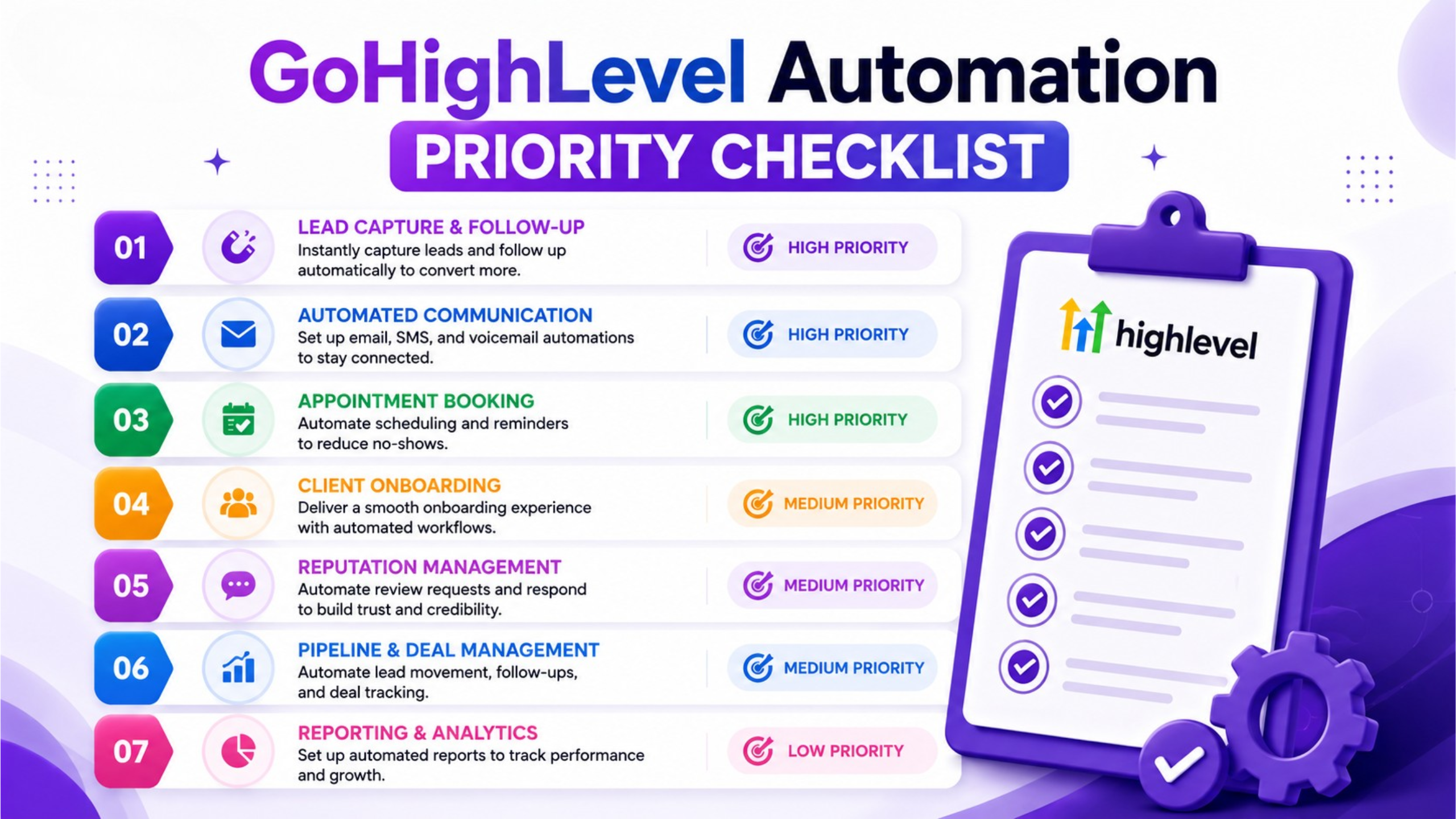
Start building them in order of importance. First, begin with the workflows that affect your leads:
Instant response workflow to leads live
Workflow to tag leads by source implemented
Follow-up sequence in place
Workflow for re-engaging unresponsive leads
Workflow for scheduling an appointment active
Reminder sequence before call (24hr and 1hr)
Workflow for rescheduling missed appointments
Workflow for pipeline stages follow-ups triggered
On-boarding sequence for new clients in place
Request review workflow after completion of a project
Notification workflow to hot leads
Long-term nurturing workflow to cold leads
Monthly client check-in workflow
Workflow for follow-up after the call
Workflow for lead score in place
Workflow to detect duplicate contacts
Workflow for dashboard update
Agencies With These Automations vs. Agencies Without
Conclusion - Build Once, Save Hundreds of Hours Each Month
All the automation tools on this list serve one purpose: eliminate manual work from your agency so that you can concentrate on growing your business.
It is the agencies that implement the GHL workflows right from the start who are able to scale their operations without burning out themselves. These agencies are faster in client onboarding, more consistent in follow-ups, retain more clients, and operate with much less manual work than their competitors.
GHL automation isn't just an optional tool for successful agencies. This is the very foundation of all efficient and scalable operations on the platform.
Start implementing the top five on this list and keep going from there. In 30 days, you'll ask yourself how you ever managed to run your agency without them.
👉 Want help building all these automations in your GHL account? Contact us now and we will implement the entire agency automation workflow in your GHL for you.
Frequently Asked Questions
Question 1. What is the time required to create all 17 automations of GoHighLevel?
A proficient GoHighLevel automation expert needs only 5 to 10 business days to create all 17 workflows - an initial investment that will save your agency 20 or more hours each week from then on.
Question 2. Is any technical expertise required for creating GHL workflows within GoHighLevel?
While basic GHL workflows can be created without any technical background using GoHighLevel’s drag-and-drop workflow builder, complex logical conditions and automation across multiple channels require a GoHighLevel automation expert.