




























GoHighLevel Email Warmup & Deliverability Guide By Funnel Pandit
GoHighLevel emails landing in spam is the most common problem users face. This comprehensive guide shares real solutions that increased open rates from 3% to 37% in 30 days. Learn how to properly set up SPF, DKIM, and DMARC records, execute proper domain warmup, monitor reputation with Google Postmaster Tools, and avoid content mistakes that trigger spam filters.
Two weeks ago, I realised something was very wrong with my GoHighLevel emails. Most of them were landing in spam and my open rate had dropped to a point where clients thought I was not sending anything at all. I kept testing different subject lines and editing my emails but nothing changed. It was clear the problem was not the content.
So I decided to go deeper into the system itself and I checked the domain, DNS, authentication and every small detail GHL does not explain properly. That is when everything finally started working. I am Funnel Pandit and after four years of building funnels and email setups I know how frustrating deliverability issues can be. This guide is simply the exact process I used to fix my own inboxing so you can avoid the same mistakes.
Why Your GoHighLevel Emails Actually Land in Spam?
Most people will tell you it's about "engagement" or "email quality". That's partly true, but it's not the root problem. The real issue? Gmail doesn't trust your emails because you haven't verified your identity.
Email Authentication:
Think about it like airport security. You show up without an ID? Doesn't matter how nice you look or what you're carrying. No ID = you're not getting through.
Email works the same way. Your emails need three IDs:
SPF (Sender Policy Framework) - Proves your email server is allowed to send from your domain
DKIM (Domain Keys Identified Mail) - Proves your email hasn't been tampered with
DMARC (Domain-based Message Authentication) - Tells Gmail what to do if checks fail
Miss even ONE of these? Your emails are fighting to deliver at the right place. Get all three right? You're 80% of the way to inbox.
I learned this the hard way when I checked "Show Original" in Gmail and saw:
SPF: NONE
DKIM: PASS
DMARC: FAIL
That's when everything clicked. My DNS was broken.
New Domain or Cold Domain
If your domain is new or has never sent emails before, it has zero reputation. Gmail does not trust cold domains. Sending bulk emails through GHL on day one almost guarantees a spam placement.
No Proper Warmup
Warmup is not about sending random emails. It is a slow and controlled process where inboxes open, reply, and engage with your messages. If you skip warmup and start a campaign immediately, Gmail sees it as suspicious activity and pushes everything to spam.
Shared IP Reputation Issues
GoHighLevel uses shared IPs for sending. If other users on the same IP abused email or sent low-quality campaigns, your inbox can suffer too. This is why high-volume senders sometimes need a dedicated IP.
Spammy Content or Heavy Templates
Even if your DNS is perfect, your email content can still trigger spam filters. Things like too many buttons, lots of links, large images, or overly designed templates often push GHL emails straight to Promotions or Spam. Simple, plain-text emails perform better.
Low Engagement History
If your audience rarely opens, clicks, or replies to your emails, Gmail marks your domain as low-trust. Low engagement tells Google that your messages are not valuable, which directly hurts your deliverability.
No Unsubscribe Link
Sending emails without an unsubscribe link is a major red flag for Gmail and Outlook. They treat these emails as risky or non-compliant, and that increases your chances of landing in spam.
The GoHighLevel Subdomain Problem Nobody Explains Properly
Here's something that confused me for DAYS that nobody talks about clearly:
GoHighLevel sends your emails through a subdomain called lc.yourdomain.com (lc = LeadConnector).
So even though your email shows as [email protected], the actual sending happens through lc.yourdomain.com.
This is CRITICAL to understand.
Gmail checks SPF based on the Return-Path (the actual sending domain), not the From address.
So you need SPF records for both:
Your main domain (yourdomaindotcom)
The LC subdomain (lc.yourdomaindotcom)
I spent 2 days wondering why my SPF kept showing none even though I had it set up "correctly." This was why.
How to Fix SPF Records in GoHighLevel?
Okay, let's fix this properly. I'm going to walk you through exactly what to add.
Step 1: Add SPF for Your Main Domain
Go to your DNS settings (wherever you manage your domain - GoDaddy, Namecheap, Cloudflare, etc.)
Add a TXT record:
Name/Host: @
Value:
v=spf1 include:spf.leadconnectorhq.com include:mailgun.org ~all
If you also use GoDaddy email (like I do), use this instead:
v=spf1 include:spf.leadconnectorhq.com include:mailgun.org include:secureserver.net ~all

Critical rule: Only ONE SPF record per domain. If you have multiple, Gmail ignores them ALL. I made this mistake twice.
Step 2: Add SPF for the LC Subdomain (This is what most people miss)
Add another TXT record:
Name/Host: lc
Value:
v=spf1 include:spf.leadconnectorhq.com include:mailgun.org ~all
This single record fixed my SPF NONE issue instantly.

Step 3: Wait and Test
DNS changes take 5-30 minutes to propagate. Don't freak out if it doesn't work immediately.
After 10 minutes, send yourself a test email. Open it in Gmail, click the three dots, select "Show original."
You should see:
SPF: PASS
If you still see NONE, wait another 10 minutes. DNS propagation can be slow.
DKIM Setup
DKIM is actually straightforward if you follow GoHighLevel's instructions.
In GoHighLevel:
Go to Settings → Domains
Select your domain
Look for the DNS Records section
You'll see a DKIM record that looks like:
Name: krs._domainkey

Value: p=MIGfMA0GCSqGSIb... (long string)
Copy that EXACT value (including all characters, no spaces)
Add it to your DNS as a TXT record
Pro tip: I paste it into Notepad first to make sure there are no hidden characters or extra spaces. Those will break it.
Test it the same way - send email, check "Show Original," should see DKIM: PASS.
DMARC - The Missing Piece
DMARC is required as of 2024 for Gmail and Yahoo. Without it, you're starting with one hand tied behind your back.
The good news? It's the easiest one to set up.
Add a TXT record:
Name/Host: _dmarc
Value:
v=DMARC1; p=none;

That's it. No quotes. No extra spaces.
Important: Start with p=none. This means "monitor but don't reject." Once your reputation is solid (2-3 months), you can change to p=quarantine or p=reject.
The 5-Minute Authentication Check That Tells You Everything
After setting up SPF, DKIM, and DMARC, here's how to verify everything actually works:
Send a test email from your GHL account to your personal Gmail
Open the email
Click the three dots (top right)
Click "Show original"
You want to see:
SPF: PASS
DKIM: PASS
DMARC: PASS


If ANY say FAIL or NONE, something's wrong. Go back and check your DNS records.
I run this test every single time I set up a new domain. Takes 2 minutes and saves hours of troubleshooting later.
Why New Domains Start in Spam
Here's the frustrating truth: even with perfect DNS, a brand new domain will struggle initially. Email providers are suspicious of new domains because spammers constantly register fresh domains.
New domains end up in spam because inbox providers have no past record of your sending behavior. When Gmail or Outlook sees a brand-new domain suddenly sending emails, it treats the activity as unverified and potentially unsafe. Until the domain builds trust, almost every message is flagged as suspicious.
Here are the main reasons:
No sending reputation or history
No engagement signals like opens or replies
Sudden sending activity looks unusual
Mailbox providers cannot confirm if the sender is legitimate
Warm-up has not been done to build trust gradually
How to warm-up your domain that actually hit the inbox
Warming up a domain is simply teaching inbox providers to trust your sending. Instead of blasting emails right away, you start small and slowly build engagement. The goal is to show Gmail and Outlook that real people open, reply, and interact with your messages. When you warm up properly, your domain reputation increases and emails start landing in the inbox instead of spam or promotions.
Here’s how to do it:
Week 1: Send 5-10 manual emails per day to real people you know. Have them reply. This is tedious but critical.
Week 2: Increase to 20-30 per day.
Week 3: Ramp up to 50-80 per day with a link.
Week 4: Increase 100-200 per day with 2-3 links and images.
Month 2+: Now you can run full campaigns.
I know this feels painfully slow. But I tried skipping it with a new domain and spent 3 weeks in the spam folder. Don't make my mistake.
Key warmup rules:
Vary your sending times (don't send at the exact time every day)
Get replies whenever possible
Avoid sending the same email repeatedly
Start with your warmest contacts (people who actually know you)
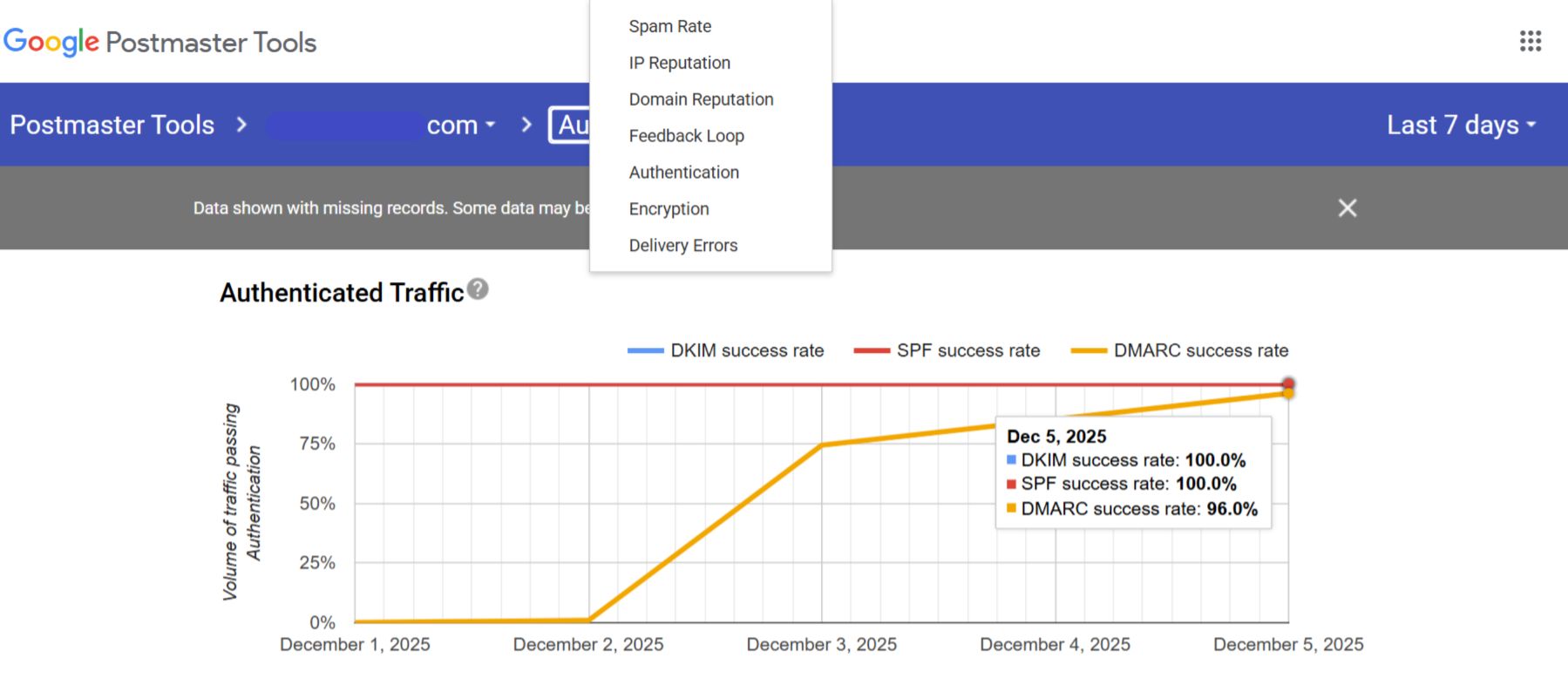
Google Postmaster Tools - Your Reputation Report Card
This free tool from Google changed how I monitor deliverability.
Set it up at postmaster.google.com. Add your domain. You'll see:
Domain reputation (High, Medium, Low, Bad)
IP reputation
Spam complaint rate
Authentication issues
Delivery errors
If your reputation shows "Low" or "Bad," you need to immediately:
Slow down sending volume
Focus on engagement
Clean your list
Improve content quality
Don't ignore this tool. It's like having inside information from Gmail itself.
The Content Mistakes That Kill Deliverability
Even with perfect DNS and warmup, certain content patterns trigger spam filters.
What I stopped doing:
Subject lines with "Free," "Limited time," "Act now"
More than 2 links in one email
Heavy HTML with lots of images
ALL CAPS anywhere
Hidden text or white text
Spammy words like "guarantee," "money back," "risk-free"
What started working:
Plain text emails (or very minimal HTML)
Conversational tone like texting a friend
One clear call-to-action
My actual name signature
Easy-to-find unsubscribe link (Very Important)
Do You Actually Need a Dedicated IP?
Short answer: probably not.
GoHighLevel uses shared IPs (multiple users send from the same IP addresses). Some people worry that this hurts deliverability if another user on the same IP sends spam.
My recommendation based on experience:
Under 10,000 emails/day: Shared IP is fine. Focus on DNS, warmup, and content instead.
10,000-20,000 emails/day: Monitor your reputation. Shared IP still usually works.
Over 20,000 emails/day: Consider a dedicated IP. You get full control over your sending reputation.
Dedicated IPs also require their own warm-up process and incur additional costs. Don't jump into it unless you actually need it.
The Complete DNS Checklist for GoHighLevel
Save this checklist. Before launching any campaign:
Authentication:
Root domain SPF includes leadconnectorhq.com and mailgun.org
LC subdomain SPF added separately
DKIM record from GHL added correctly
DMARC policy set to p=none
Only ONE SPF record per domain
Test email shows SPF/DKIM/DMARC all PASS
Reputation:
Domain age is at least 2 weeks
Google Postmaster Tools connected
Reputation shows "Medium" or higher
Spam rate under 0.3%
Content:
Plain text or minimal HTML
One main link/CTA
Conversational tone
Clear unsubscribe link
No spam trigger words
List Quality:
No purchased lists
Bounces removed
Unengaged contacts cleaned
Recent opt-ins prioritized
Tools to Monitor Your Deliverability
Mail-tester.com - Send test email, get instant score. Aim for 9/10 or higher.
MXToolbox.com - Check SPF, DKIM, DMARC setup. Verify DNS records propagated.
Google Postmaster Tools - Monitor reputation, spam rate, authentication issues.
GlockApps - Paid tool that shows exact inbox placement across providers.
I check Mail-testers before every major campaign. Takes 30 seconds and catches issues early.
Quick Testing Links:
Check SPF/DKIM: mxtoolbox.com
Test email score: mail-tester.com
Monitor reputation: postmaster.google.com